
Designing across a connected learning ecosystem
From Junior Designer on MyNavigator to the sole designer across its learner, instructor, mentor and library products.
Contents · 12 chapters
One learning ecosystem. Different experiences for everyone involved in learning.
MyGooru, originally known as MyNavigator, was built around the idea of a GPS for learning. Rather than giving everyone the same learning experience, the platform used competencies, learning goals and progress data to support personalised journeys.
The ecosystem consisted of connected applications for learners, instructors, mentors, institutional leaders, content teams and administrators. Each application addressed a different responsibility while working with the same underlying learning system.
My part
I joined Gooru in July 2022 as a Junior Designer, when the product was still called MyNavigator.
At first I worked on individual features alongside another designer. Over time I took on larger workflows and whole products, and eventually became the only designer across the ecosystem, in a Product Designer role.
I didn't try to make every experience identical. The harder question was what each user needed to see, understand and act on.
- ROLE
- Junior Designer → Product Designer
- WORKED WITH
- CTO · Product Manager · Engineering
- PRODUCTS
- Learner · Instructor · Mentor · Library · Design System
- TIMELINE
- 2022 onwards
Internal product work. Unreleased surfaces, roadmap and commercial specifics are withheld.
Learning that adapts to where you are.
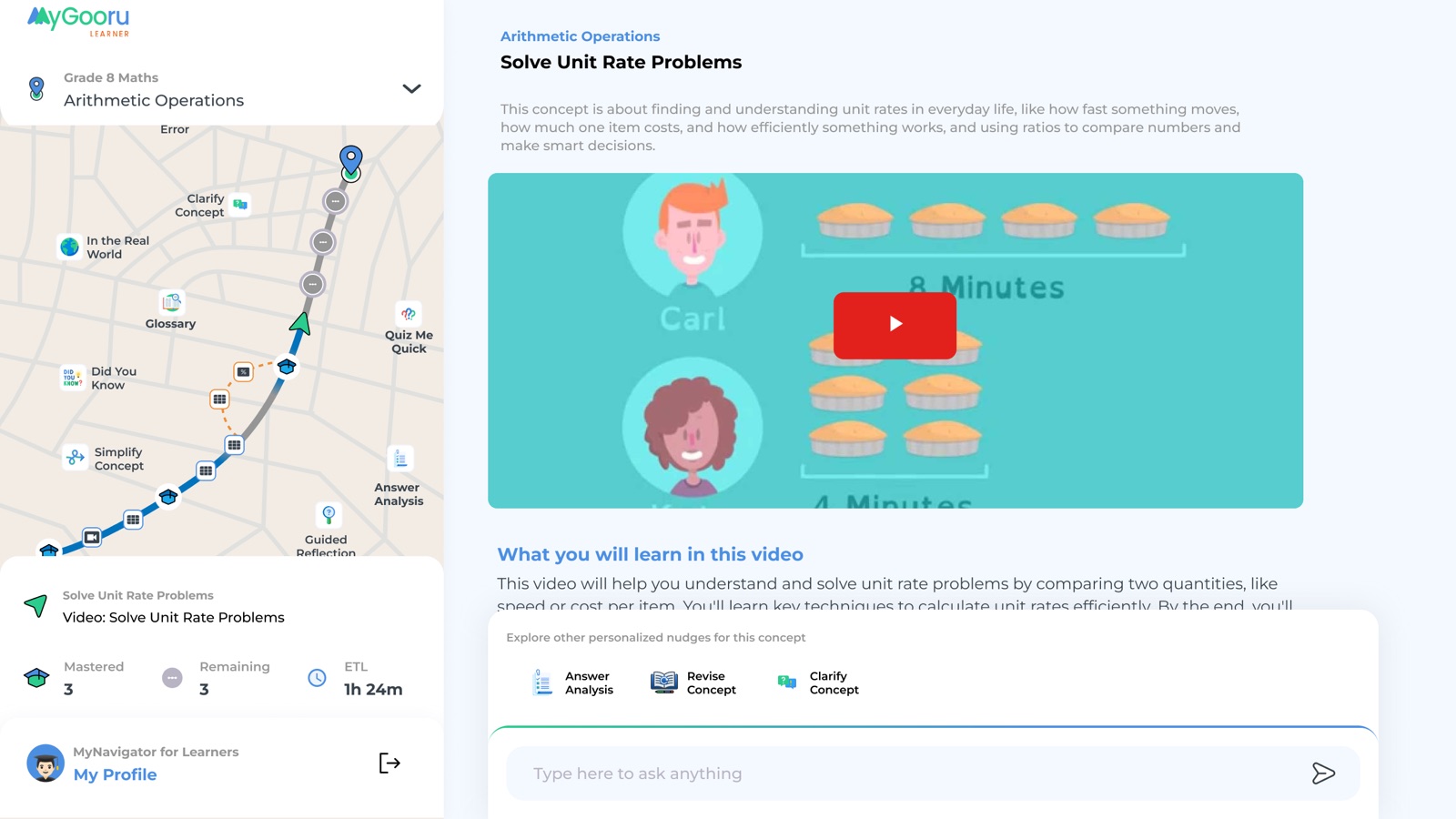
MyGooru Learner helps students take ownership of their learning, starting from what they already know rather than assuming everyone should follow the same path.
Learners can begin with a diagnostic assessment that identifies their understanding across different competencies. Their current knowledge is represented through a Skyline, while their desired learning destination provides a goal to work towards. The system uses this information to create personalised pathways and recommend activities suited to their needs.
Through the Study Player, learners engage with videos, interactive lessons, practice questions, assessments and offline activities. As they progress, the pathway can adapt, offering additional support when they struggle or allowing them to move ahead when they demonstrate mastery.
Learners can also explore their competency map, revisit concepts, track progress and understand what remains between their current position and their learning goals.
At its core: Helping learners understand where they are, what they need to learn and how to get there.
My part
The Learner app was where students followed their learning journey: where they were, what they were working towards and what came next. I worked on several parts of it, turning dense learning information into something a learner could understand and act on.
The interface had to show progress without exposing everything underneath it.
Understanding every learner, not just the classroom average.
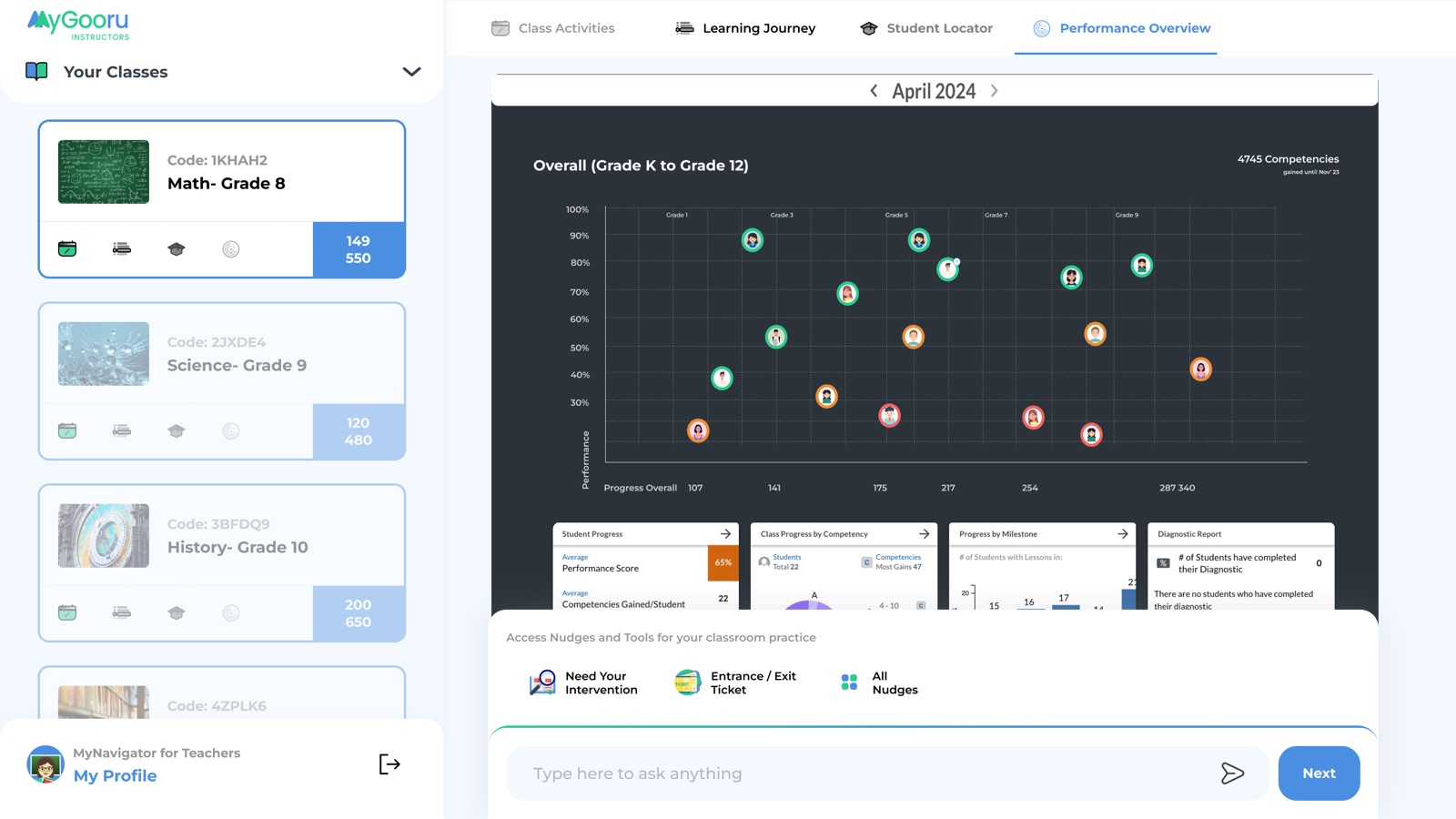
MyGooru Instructor helps teachers understand what is happening across their classrooms and respond to the different needs of individual students.
Instead of relying only on test scores or overall class performance, instructors can explore learner progress at the competency level. They can see what students have mastered, where they are struggling and which learning gaps may need additional attention.
The platform provides class-level overviews alongside detailed individual learner information. Teachers can use these insights to identify students who need support, explore recommended resources, assign activities and plan targeted interventions.
Instructors can also use learning content and assessments to reinforce concepts, support different levels of understanding and monitor how students respond over time.
The experience connects classroom decisions with the learner's ongoing journey, giving educators a clearer picture of both individual and collective progress.
At its core: Helping instructors move from understanding learner performance to providing the right support.
My part
The same information needed a very different hierarchy for instructors. They weren't following one person's journey; they needed to see what was happening across learners and where their attention was needed.
I worked on the Instructor app to make learner progress quicker to scan and act on.
Staying connected to a learner's journey beyond the classroom.
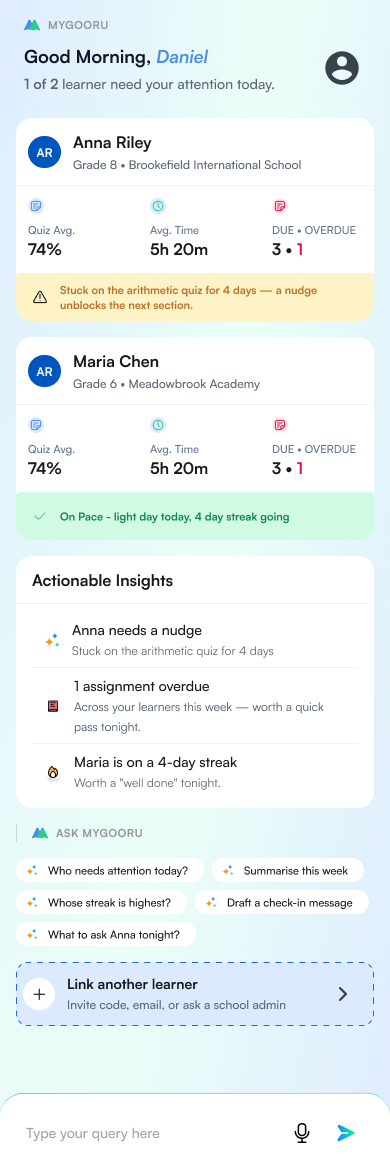
MyGooru Mentor extends visibility into learning to parents, guardians and other people supporting a learner's development.
Mentors can connect to a learner's account and follow their progress across courses and classes. They can see what the learner is working on, how their understanding is developing and where they may be encountering difficulties.
Rather than seeing only final results or report cards, mentors can explore competency-level progress and understand the learning journey as it unfolds.
The experience helps them recognise achievements, understand areas requiring support and have more meaningful conversations about learning goals.
Unlike instructors, mentors are not primarily responsible for managing classroom activities or assigning work. Their role is to provide encouragement, guidance and support informed by the learner's progress.
At its core: Giving mentors enough context to support the learner without needing to manage the learning experience themselves.
My part
Instructors work across groups of learners. Mentors needed a closer view of one person: their journey, their progress and where support might help.
I organized the Mentor app around the relationship between one mentor and one learner, rather than shrinking the Instructor app down.
Seeing the bigger picture across an institution.
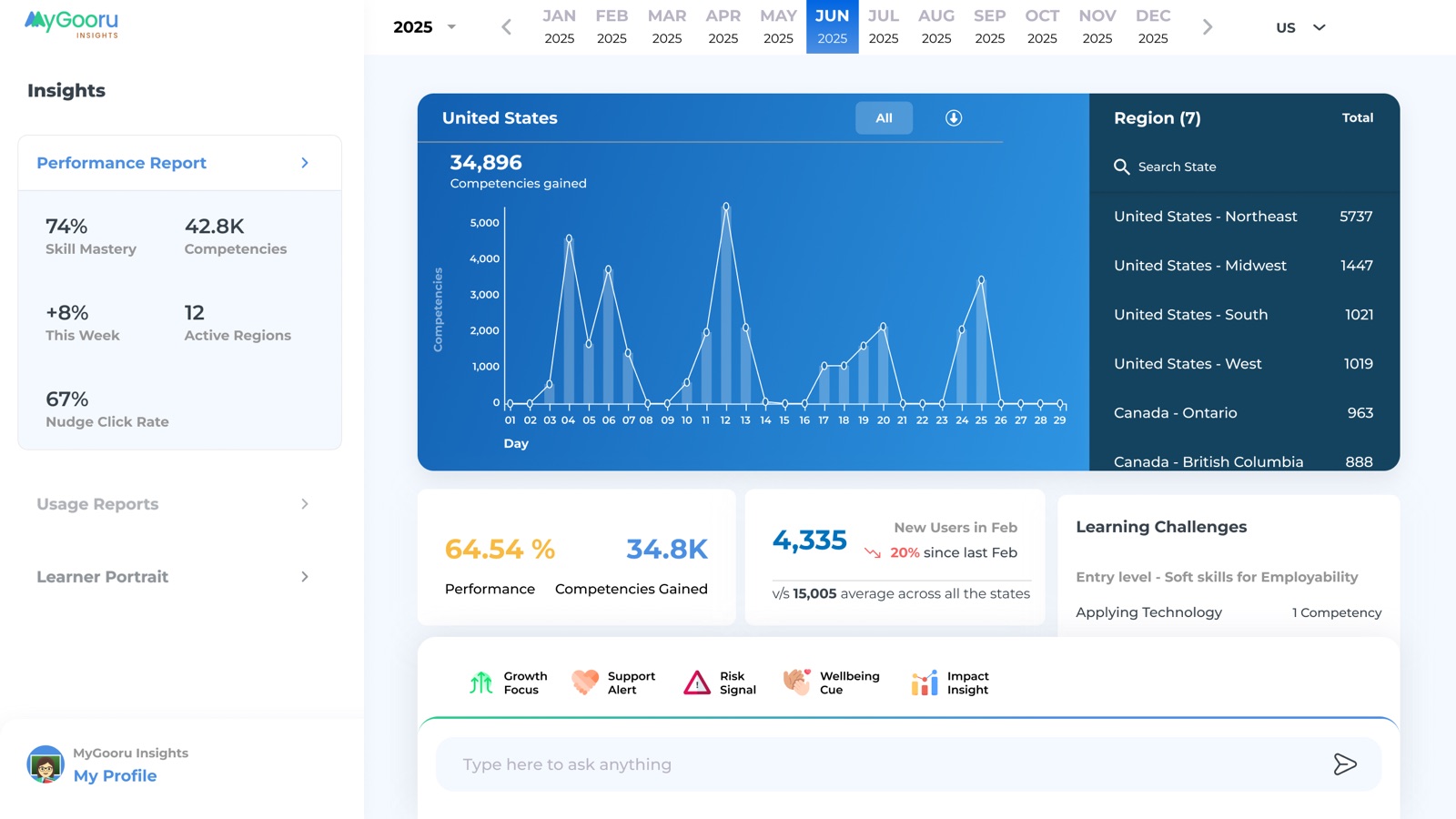
MyGooru Insights, previously called Mission Control, gives school leaders, programme directors and institutional administrators visibility into learning performance beyond individual classrooms.
While instructors focus on their students, Insights brings together information across classes, cohorts, schools and learning programmes.
Leaders can examine learning progress, competency mastery, engagement and performance patterns to understand how their institution is progressing towards its educational goals.
The experience supports both high-level reporting and more detailed exploration, helping teams identify where learning is progressing well and where additional attention may be required.
These insights can inform decisions about teaching support, programme planning and resource allocation, making learner progress useful not only to teachers but also to the people responsible for the wider learning environment.
At its core: Turning learning data across an institution into information that supports better planning and decisions.
Connecting learning content with the competencies it supports.
MyGooru Library provides educators and content teams with a place to discover, organise and manage learning resources.
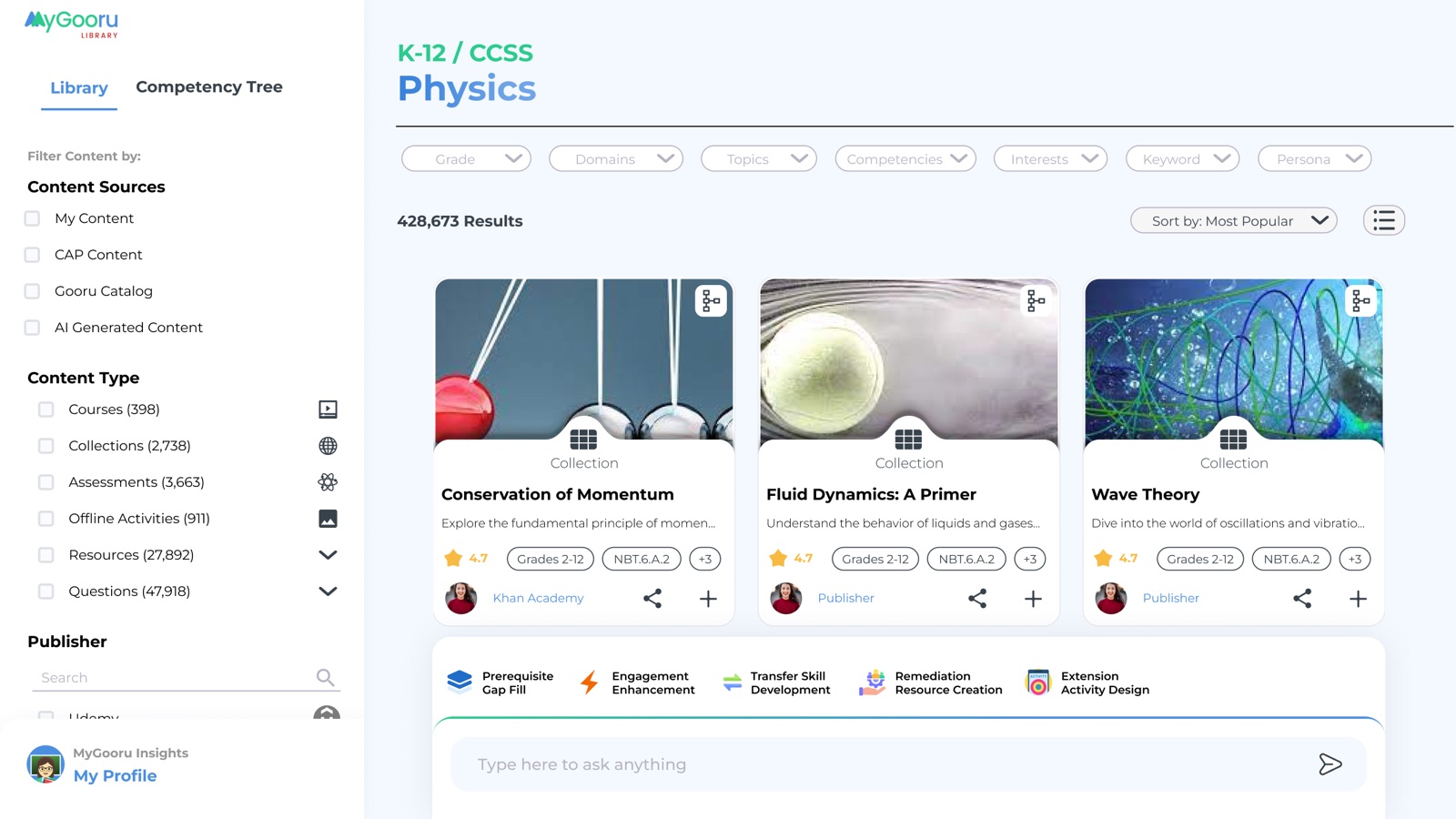
The library brings together educational materials such as videos, articles, interactive experiences, practice questions and assessments. Resources can be organised around subjects, courses, competencies and curriculum standards.
Educators and curriculum teams can use these materials to assemble learning experiences, build courses and align content with specific learning objectives.
Institutions can also incorporate their own content alongside existing resources, allowing their curriculum to become part of the wider personalised learning system.
The important distinction is that Library does more than store educational content. By connecting resources with competencies, it helps the platform identify which activities can support a learner's particular needs.
At its core: Making learning content discoverable, structured and useful within personalised learning pathways.
My part
Learner, Instructor and Mentor read learning information; Library was where parts of those structures were created and managed.
One of the parts I worked on was Marker: creating a Marker, building its map and working with competencies. These workflows were far more structurally complex than anything learners saw.
My job was to make that manageable without taking away the control people needed to build these structures. Instead of showing everything at once, the workflow revealed the structure step by step as people went deeper.
Managing the structure behind the learning experience.
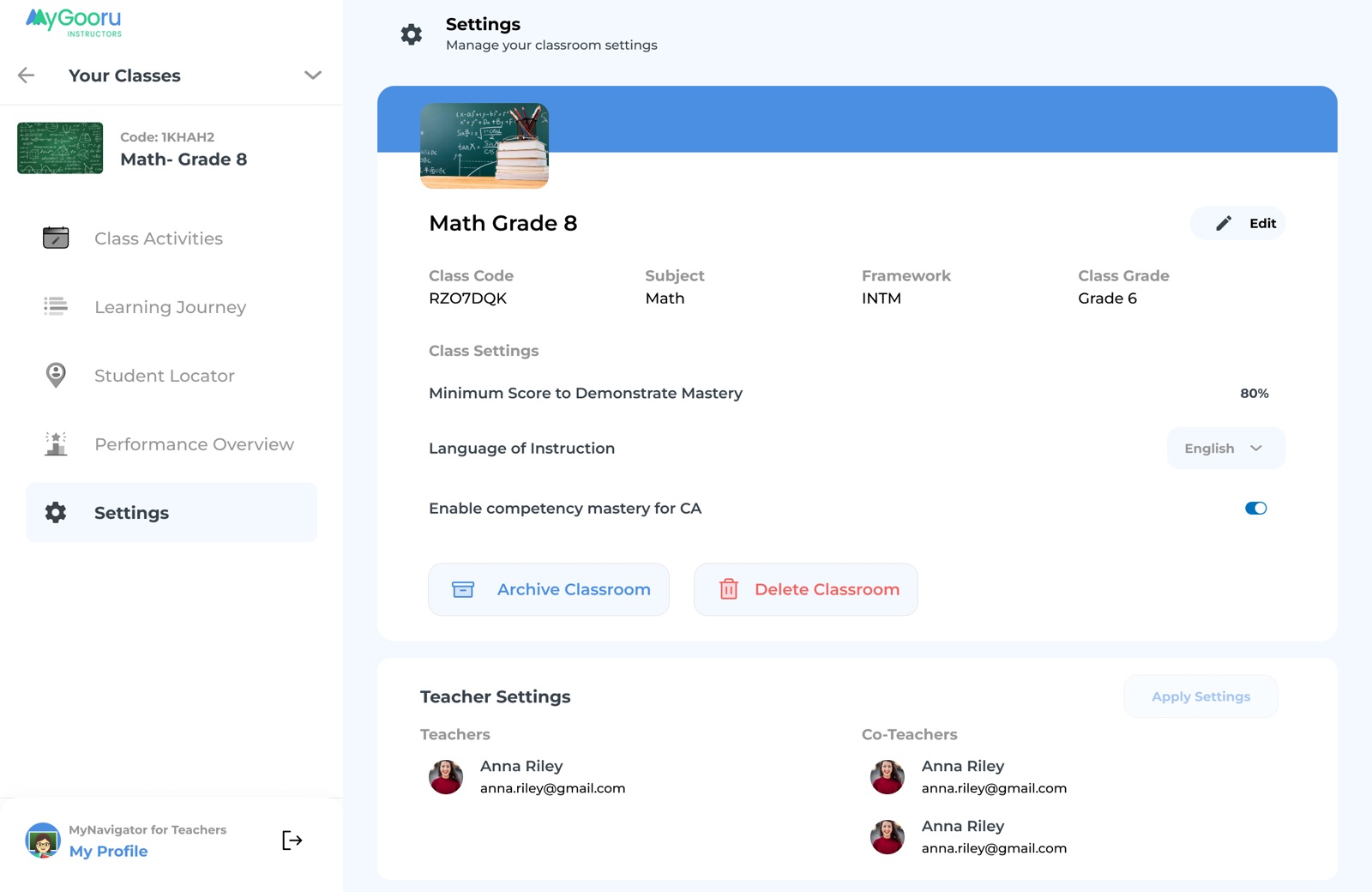
MyGooru Admin supports the institutional setup and day-to-day management required to operate the ecosystem.
Administrators can configure their institution's environment, manage user accounts and organise learners, instructors and other stakeholders into the appropriate classes and programmes.
The application supports rostering, role management and access permissions, ensuring that different users receive the right tools and level of visibility.
It also provides the administrative foundation for configuring learning programmes and managing the organisational structure in which the other applications operate.
While learners and instructors interact directly with the learning experience, Admin handles much of the setup that allows those interactions to happen within an organised institutional environment.
At its core: Keeping the people, permissions and institutional structure behind the ecosystem organised.
What connects these products?
Although each application serves a different purpose, they are connected through shared learning information.
Learners engage with activities and build competency mastery. Instructors use that progress to understand where support is needed. Mentors follow the same journey from a different perspective. Institutional leaders examine patterns across larger groups, while Library and Admin support the content and structure needed to keep the ecosystem running.
Each product provides a different view into the same learning environment.
Building consistency across products
Working across several products, I kept running into the same interaction problems.
There was already a component library when I joined. As I took on more, I grew it alongside the products: fixing existing components, adding missing states, and adding shared patterns wherever the same problem kept coming back.
I wasn't trying to make Learner, Instructor, Mentor and Library look identical. I wanted shared foundations, with each product still free to do its own job.
From individual features to product ownership
My role changed a lot during my time on MyNavigator.
I joined as a Junior Designer working on individual sections. As I learned the ecosystem, I started owning complete workflows across its products. Eventually I was the only designer, working directly with the CTO and Product Manager.
That changed the level I worked at. I stopped thinking mainly about single screens and started thinking about how a decision played out across products.
The next chapter: MyGooru Companion
As the ecosystem evolved, we began exploring how its existing learning context could support more direct, personalised interactions.
Instead of requiring people to navigate multiple areas to find what they needed, the Companion could use context, beliefs, goals and progress to help surface a relevant next step.
What happens when navigating a complex ecosystem starts becoming a conversation?
The rest of the family
The learner, instructor and mentor apps have their own case study. These are the surfaces around them, one product at a time.
Mission Control is the network view. Whoever runs a programme opens it to see how every region is doing this month: competencies gained, skill mastery, how many nudges were taken up. The chart is the answer to “where should we look?”, and the region list beside it is where they click next.
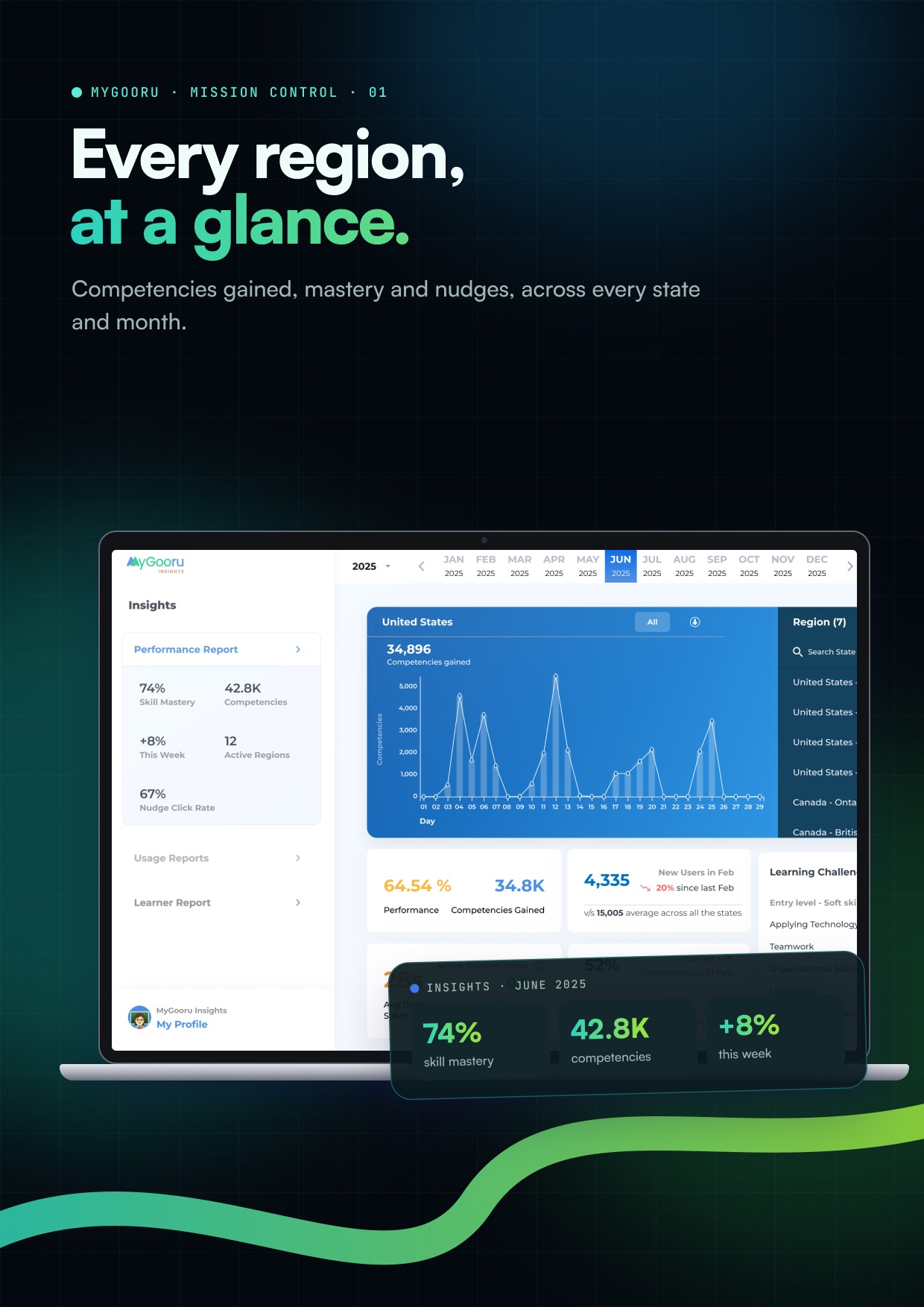
Mission Control · performance
Competencies gained, skill mastery and nudges, by region and month.
The same data, narrowed to one person. The learner report sets knowledge, mindsets, interests and abilities side by side, and opens on a sentence a person can act on rather than a score. It connects the network view to the people in it.
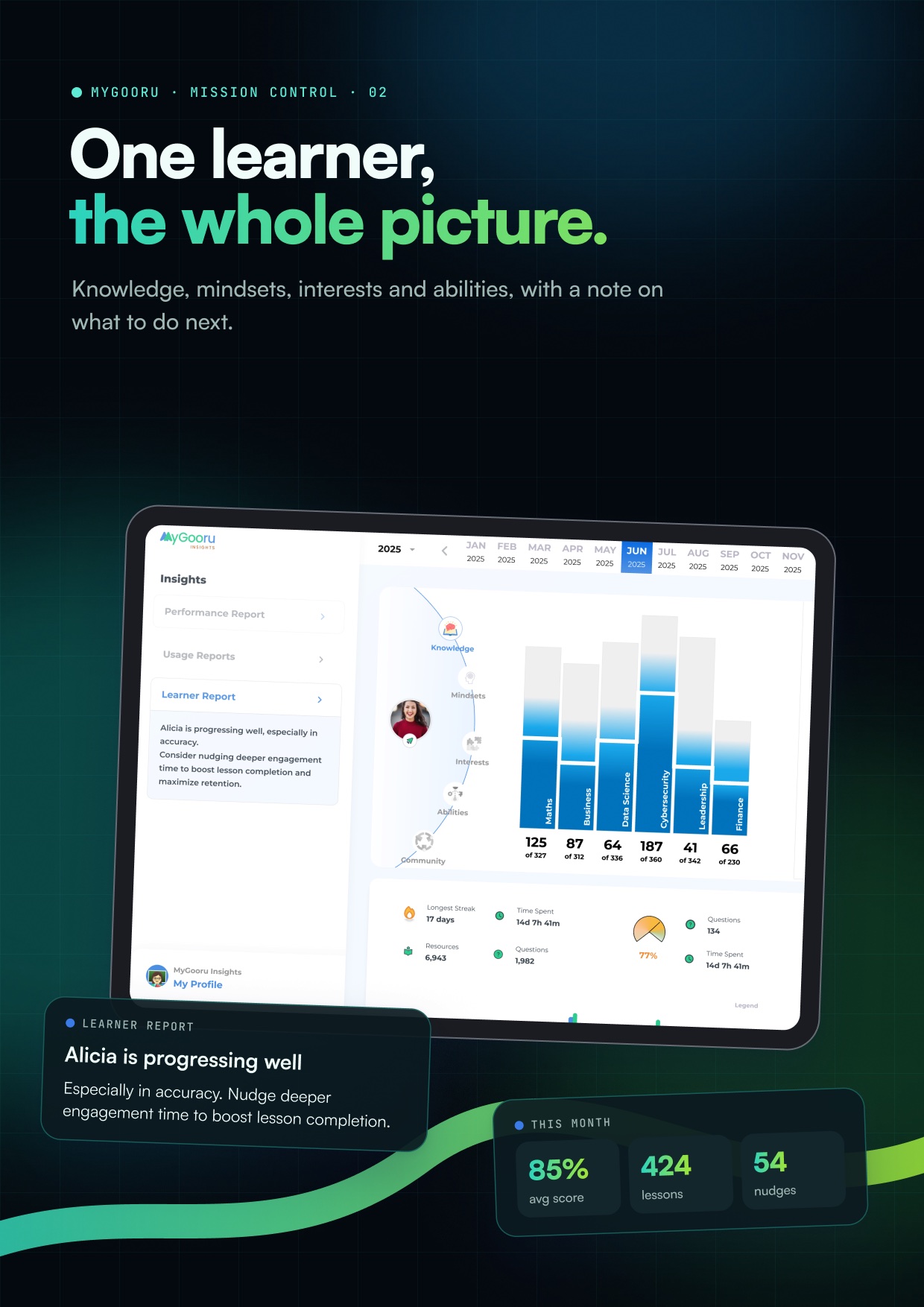
Mission Control · one learner
The learner report, led by a plain-language note.
The library is where every resource lives, whoever published it. Search runs across courses, collections, assessments and offline activities at once, and the filters follow how a teacher actually looks: by type, by source, by standard.
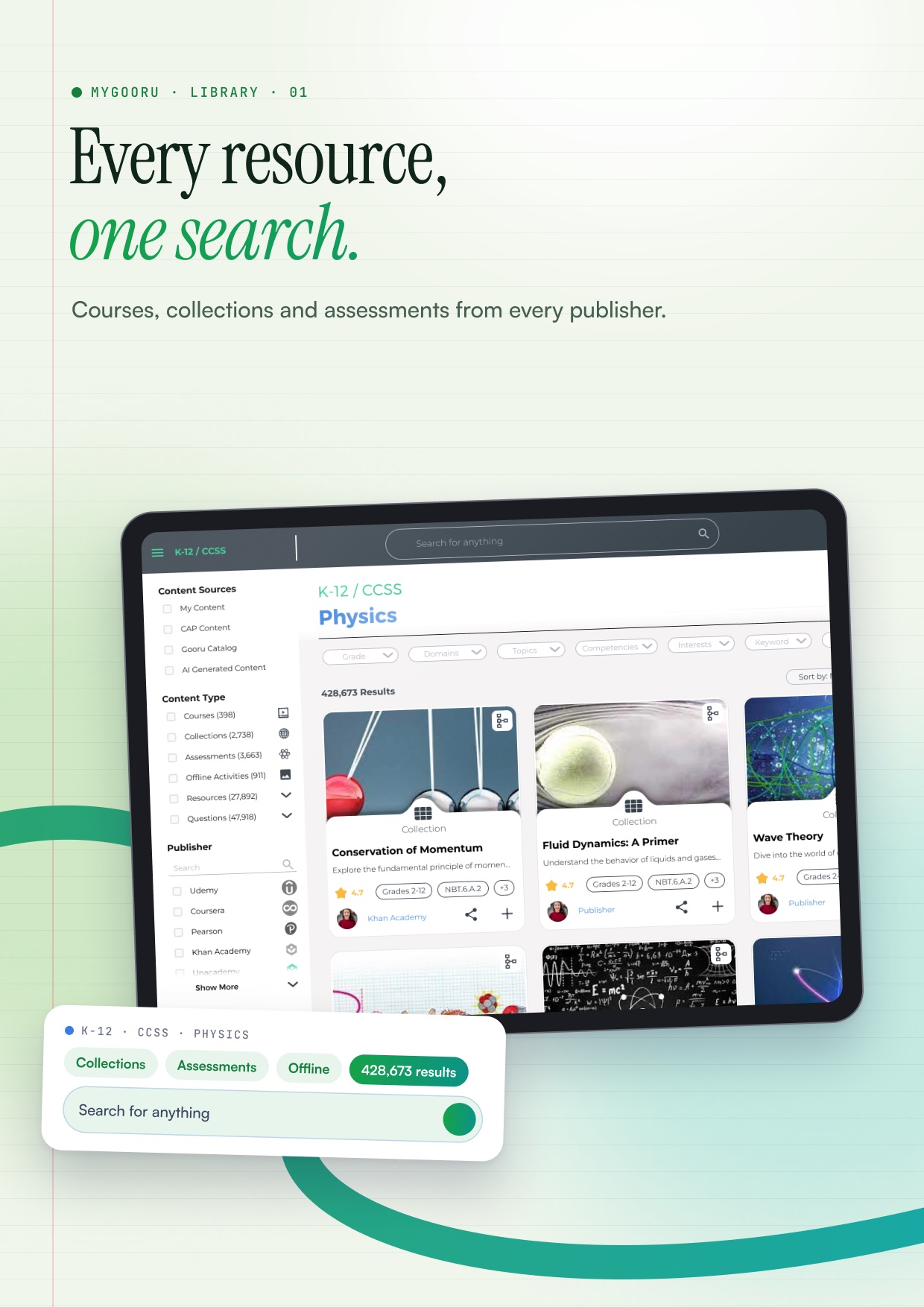
Library · search
428,673 results, filtered by type and publisher.
Behind the search sits the standards tree. Each resource hangs off a competency, and each competency sits under a topic, a domain and a category. That structure is what lets the learner app say “this video teaches that skill” and mean it.
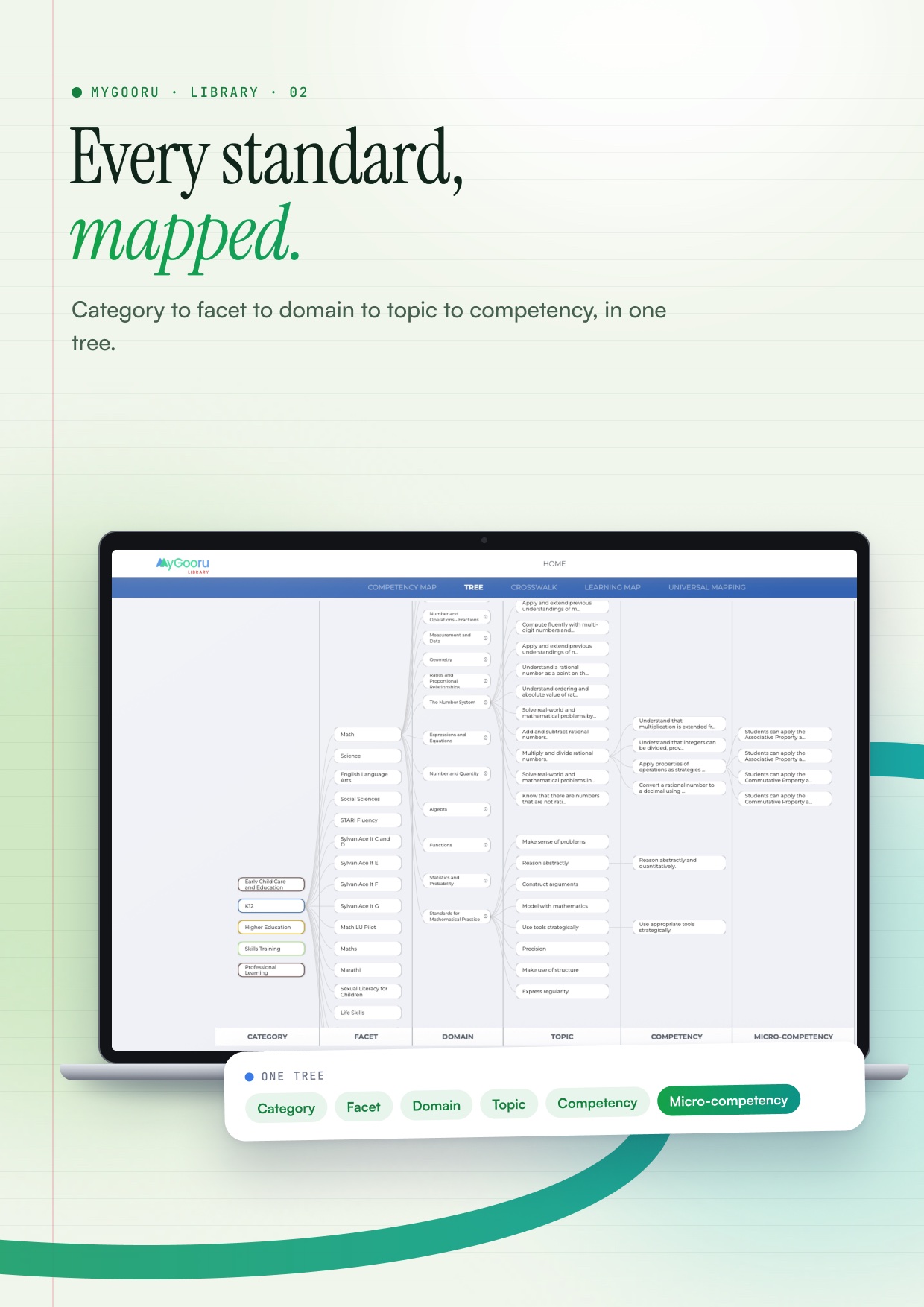
Library · the standards tree
Category to micro-competency, in one view.
The admin console starts from the documents an organisation already has: tender frameworks, transformation roadmaps. MyGooru reads them and builds a model of the organisation’s goals, processes, roles and beliefs, so nobody fills in a setup form.
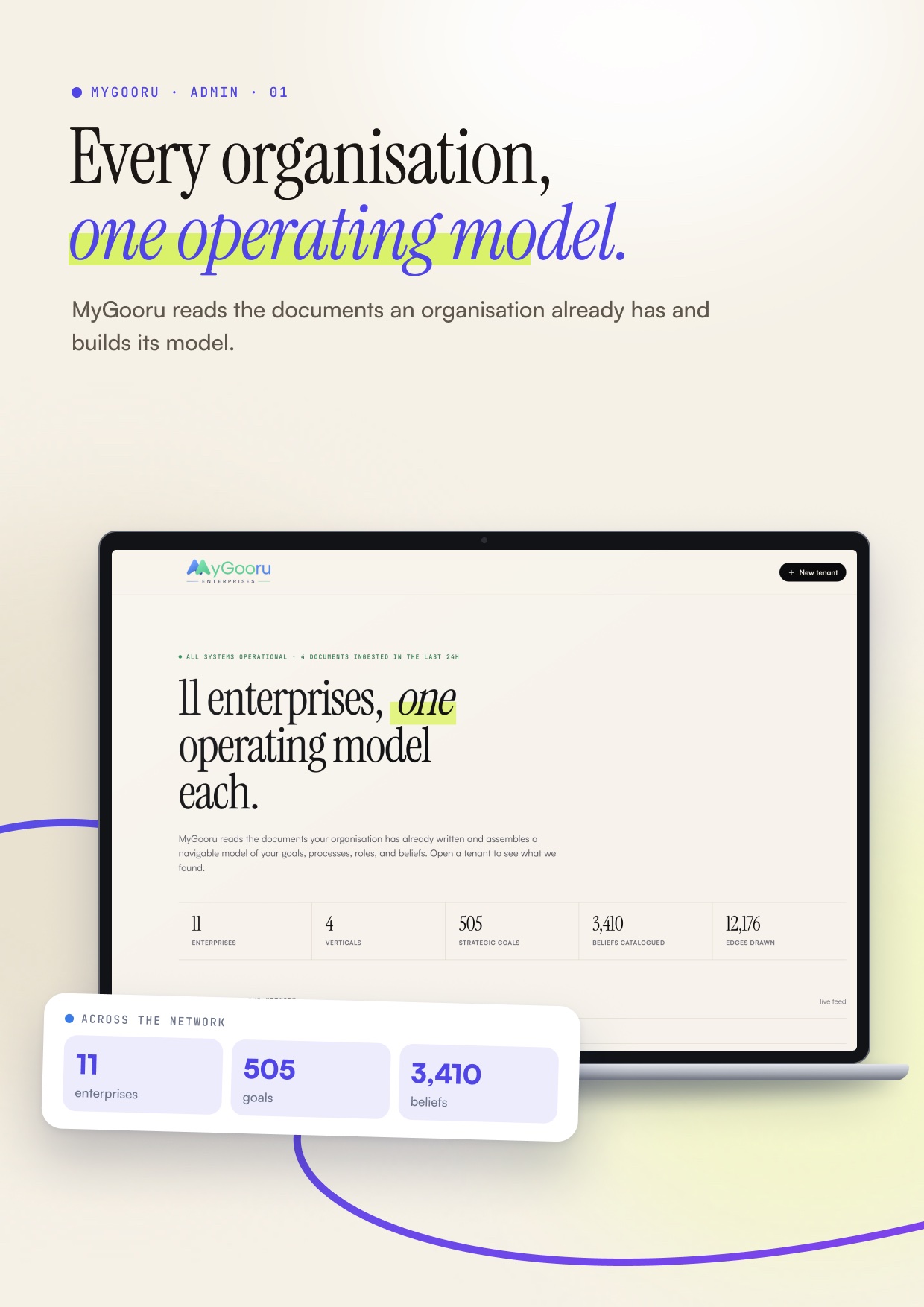
Admin · the network
11 enterprises, 505 strategic goals, 3,410 beliefs catalogued.
Inside one organisation, every goal breaks down into markers, beliefs and the roles that own them. A goal with nothing linked is visible as exactly that, which is where the conversation with leadership starts.
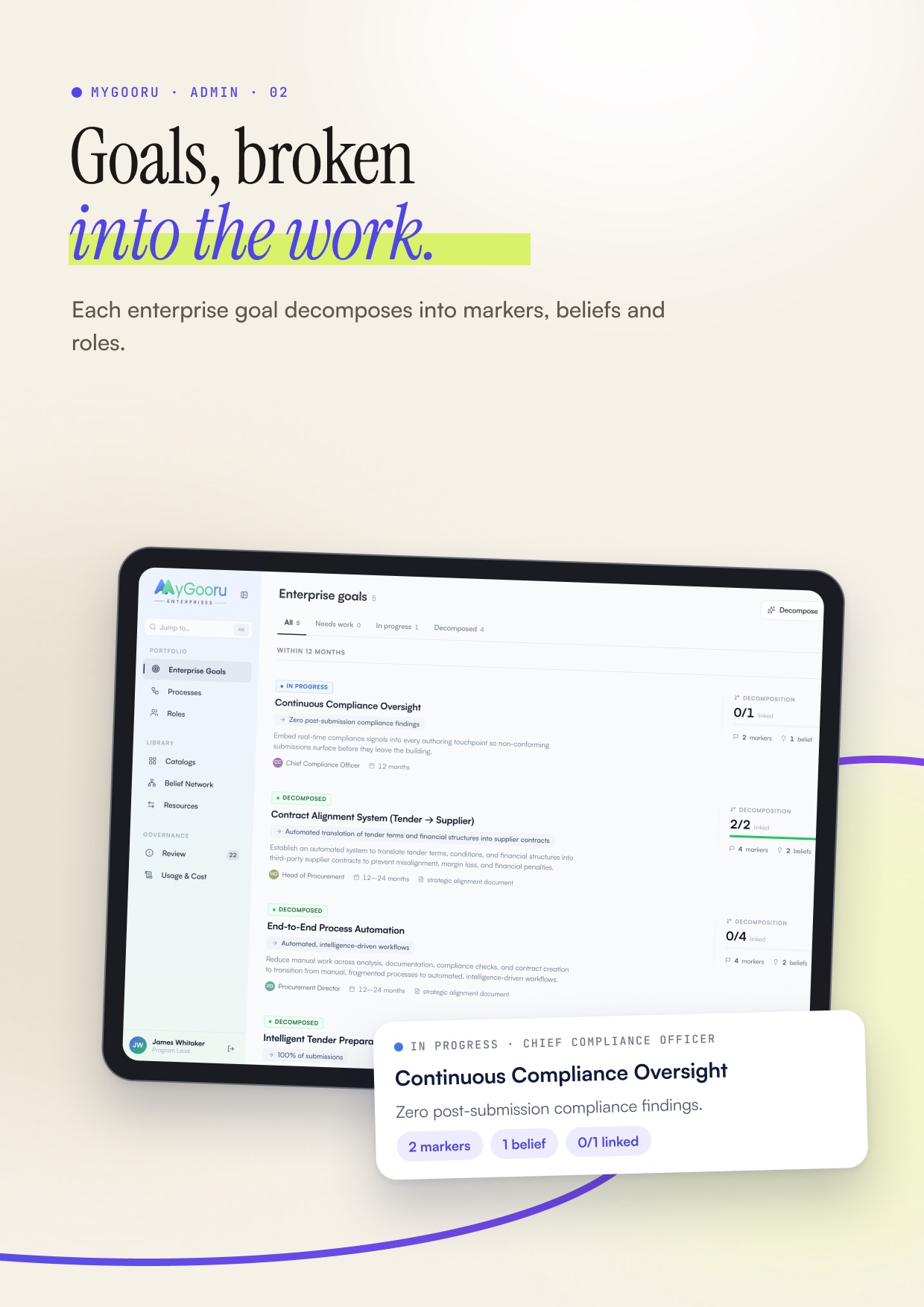
Admin · enterprise goals
Each goal with its owner, horizon and decomposition.
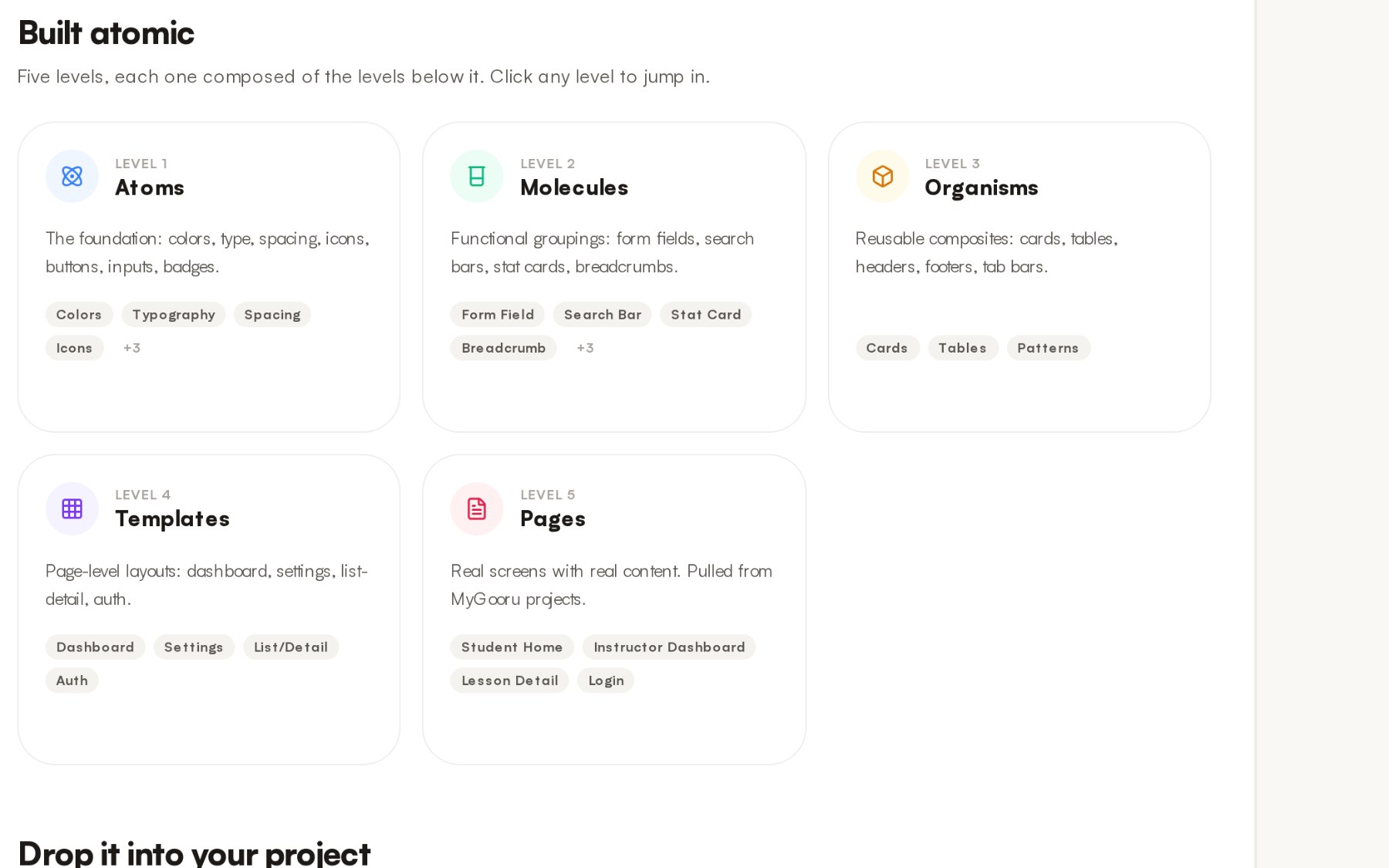
All of these products sit on one design system, built atom first. Buttons, badges and avatars combine into rows and stats, rows into menus and tab bars, and those into whole screens. A fix at the bottom reaches every product above it.
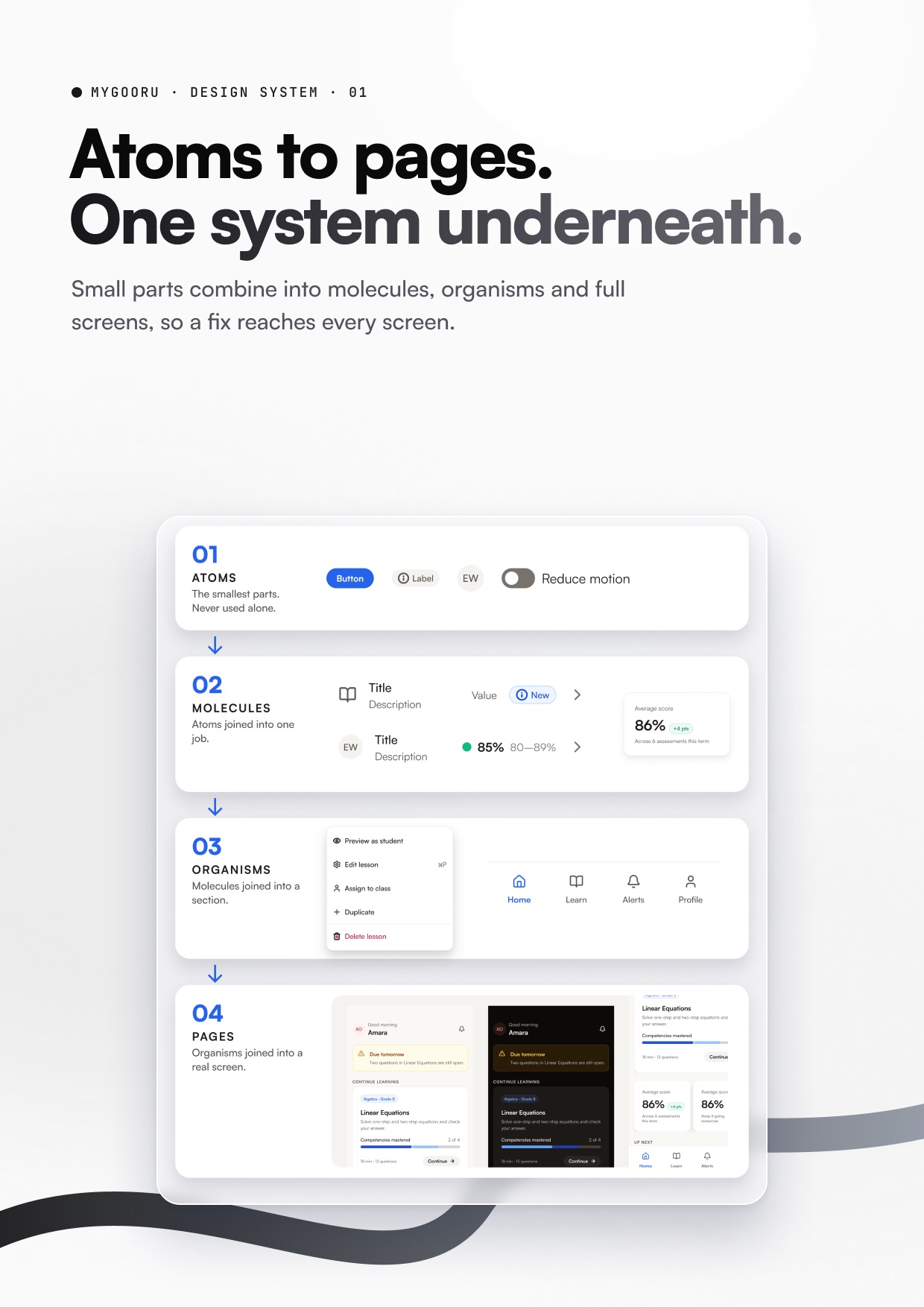
Design system · atoms to pages
Real components, from a button up to the student home.
The Row is the clearest example. Instead of a variant for every use case, it is one full component with every element inside, each switched on or off. Only real states are variants. Nineteen properties and four states cover every list in the family.
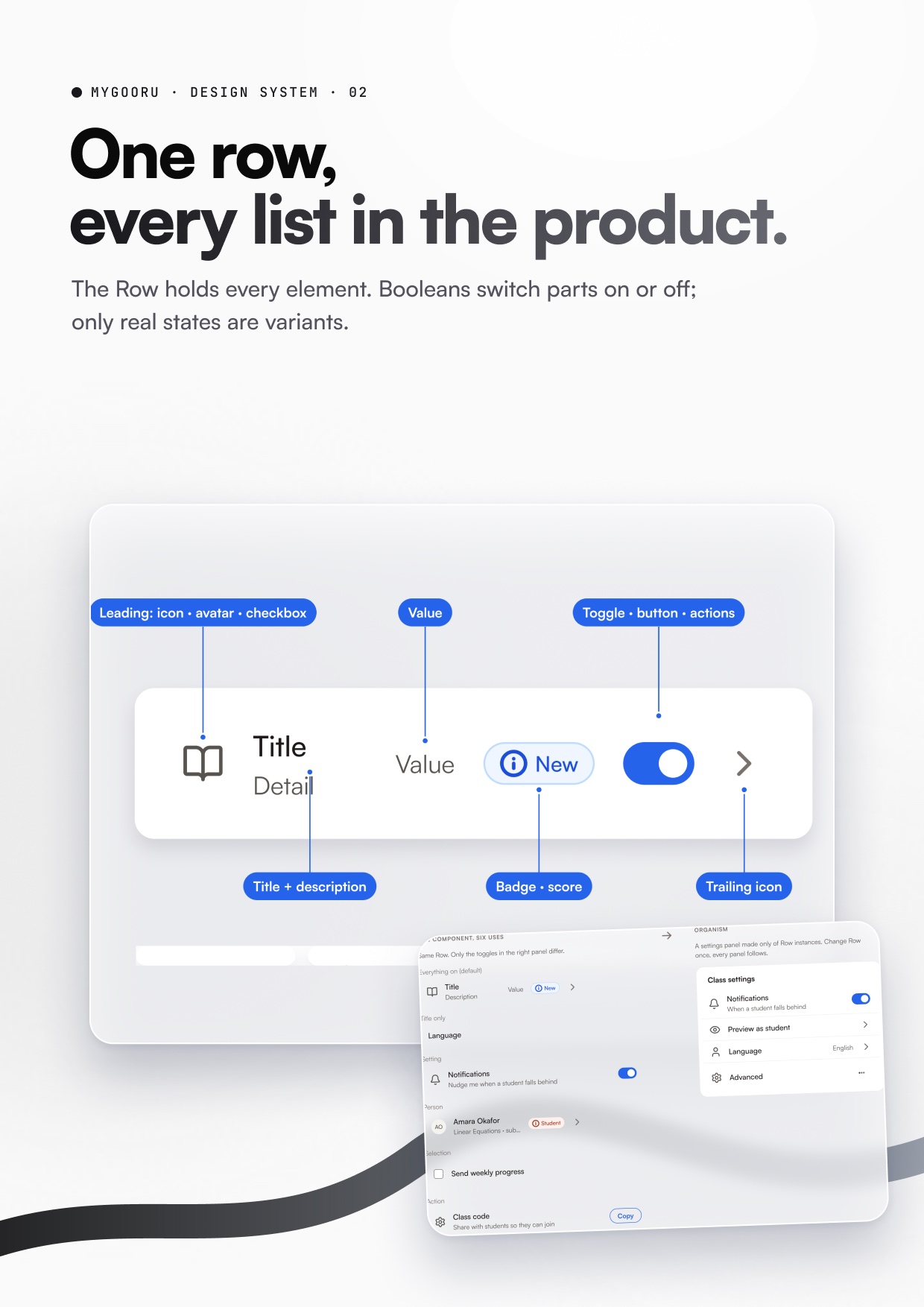
Design system · the Row
Its anatomy, and a settings panel built only from Rows.
Curriculum Crosswalk
Curriculum data scattered across spreadsheets, turned into one connected model — and the Crosswalk, Dependencies, Learning Journey Builder, Coverage, Resource Map and Companion workflows built on it, closing the loop from curriculum gap to content planning.